Slop Sheets · free, in your browser
Open a CSV file as a table
A CSV in a text editor is a wall of commas. Drop it on Slop Sheets to see it as a table with columns you can sort and filter.
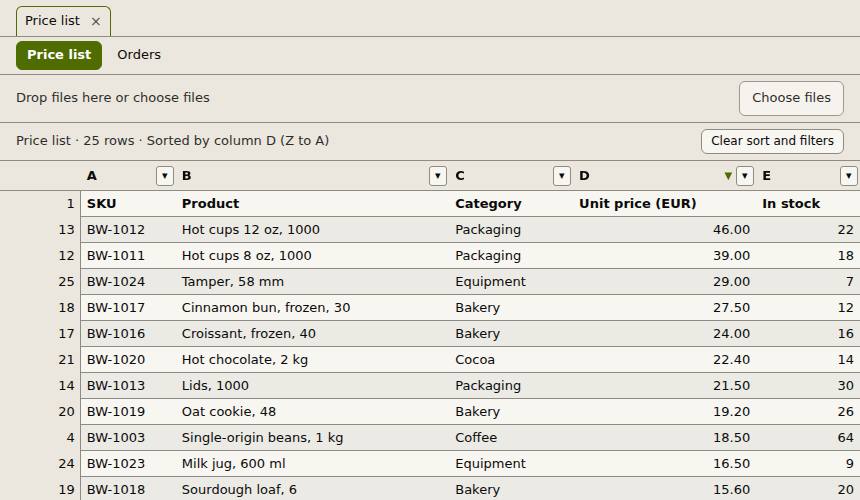
How to do it
- Drop the .csv or .tsv file on the page, or choose Open.
- Click a column header to sort by it; click again to reverse.
- Use a column's filter button to keep only some values, rows that contain a text, or numbers above or below a value.
- Choose Export, Visible rows to save just the filtered rows as CSV, TSV or XLSX.
Your files stay on this device: Slop Sheets runs in your browser, with no upload, no account and no watermark.
Questions
Which separators work?
Commas in .csv files and tabs in .tsv files, with quoted fields as most programs write them. A file without a name hint is checked for tabs.
Can I turn the CSV into an Excel file?
Yes. Choose Export and pick XLSX for the visible rows or for all rows.
Is my data sent anywhere?
No. The CSV is read in your browser and stays on your device.
More with Slop Sheets
Related apps
 Slop Tables
In development
Excel and Google Sheets, rebuilt for the browser. SlopLabel
Beta
Design and print barcode labels. Slop Contacts
In development
Address book: vCard and CSV in and out, duplicates merged.