SlopCut · free, in your browser
Make a GIF from a video
Pick a few seconds of any clip and export them as a looping animated GIF. Choose the width and the frame rate; the GIF is made on your device.
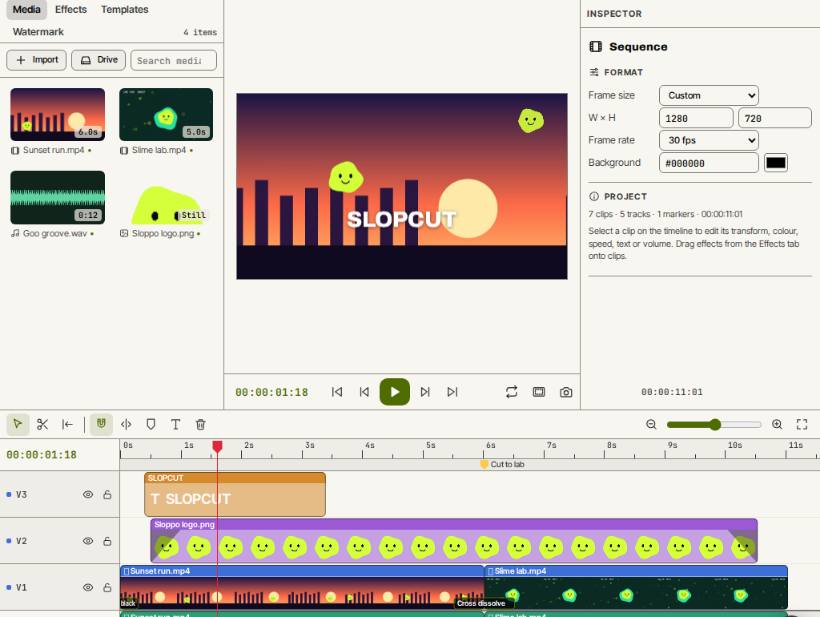
How to do it
- Open SlopCut and drop your video on the page.
- Move the playhead to where the GIF should start and press I, then to where it should end and press O.
- Press Export and choose Animated GIF (short clip) as the Format.
- Choose In to out as the Range, a Width of 320, 480 or 640 px, and 10, 12 or 15 fps.
- Press Export, then Download the GIF.
Your files stay on this device: SlopCut runs in your browser, with no upload, no account and no watermark.
Questions
How long can the GIF be?
Up to 15 seconds. When the range is longer, the first 15 seconds are used, so set in and out points to pick the part you want.
Can I add text to the GIF?
Yes. Add a title from the Effects tab before you export; it is drawn into every frame of the GIF.
Why is my GIF so large?
GIF is an old format with at most 256 colours per frame and simple compression. A smaller width, a lower frame rate or a shorter range all make the file smaller.
More with SlopCut
- Merge videos into one
- Trim or cut a video
- Add text to a video
- Make a split screen video
- A free CapCut alternative that never uploads your footage
Related apps
 Slop AI Tools
Beta
OCR, speech to text, denoise, auto tags and portrait blur. On your device. Reel Remix
In development
Clips and photos in, a random edit out, then fine-tune in SlopCut. Slop Resize
Beta
Resize pictures and videos to a size, a percentage or a file limit. Nothing uploaded.