Slop EML · free, in your browser
Open an .eml email file
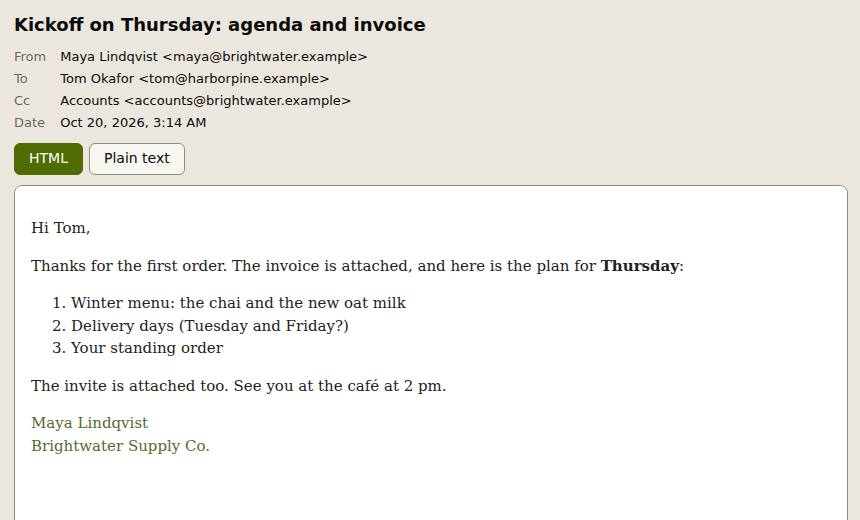
An .eml file is one saved email. Drop it here to read it as it was sent: sender, date, subject, the HTML or text body, and the attachments.
How to do it
- Drop one or more .eml files on the page, or choose Open. Several at once go into a list you can search and sort.
- Read the headers and the body. Switch between HTML and Plain text when the message has both.
- Choose Show embedded images to see pictures that are inside the message.
- In the Actions panel, open an attachment to preview it, Save it, or open it in another Slop app.
Your files stay on this device: Slop EML runs in your browser, with no upload, no account and no watermark.
Questions
Will the email load tracking pictures?
No. Remote images stay blocked and nothing loads from the network, so the sender cannot see that you opened it.
Can it open Outlook .msg files?
No. Slop EML reads .eml (MIME) files and .mbox mailboxes, the formats most mail apps use when you save, drag out or export messages.
How are several attachments saved?
One attachment downloads as it is. Save all puts them into one ZIP named after the message.
Is the email uploaded?
No. The file is read in this page and never leaves your device.
More with Slop EML
Related apps
 Slop PDF
Live
Organise, edit and sign PDFs. Nothing uploaded. SlopLabel
Beta
Design and print barcode labels. Slop Reports
Beta
Totals and lists across Contacts, Invoices, Expenses and CRM, with profit by month. Read-only.