Slop Photo Sorter · free, in your browser
Cull a photo shoot with the arrow keys
After a wedding, an event or a holiday, the slow part is picking. Slop Photo Sorter shows one photo at a time and takes one key per decision, so you get through hundreds quickly and download only the keepers.
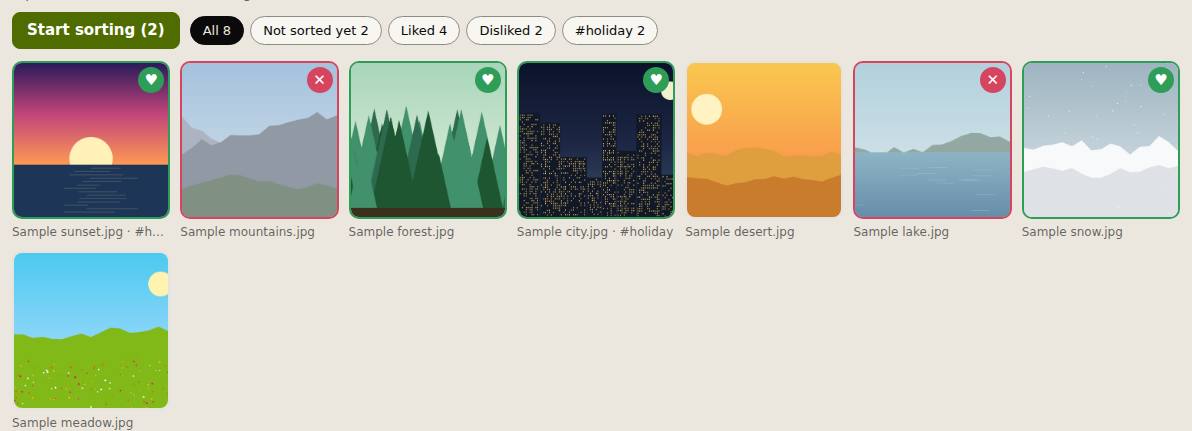
How to do it
- Drop your photos on the page, or use Choose a folder… for a whole folder and its subfolders.
- Press Start sorting. Press ↑ to like and ↓ to dislike; each moves to the next photo.
- Press → to skip ahead and ← to go back. Type a letter to add tags, such as "print" or "client".
- Use the filters (Liked, Disliked, Not sorted yet or a tag) to review your picks.
- Choose Download liked (ZIP), Save liked to Slop Drive, or Download the list (CSV).
The CSV lists every photo with its folder, the decision and its tags, which helps when you hand a selection to a client or an editor. The photos stay as they were: the ZIP holds the original files.
Your files stay on this device: Slop Photo Sorter runs in your browser, with no upload, no account and no watermark.
Questions
Is my progress saved if I close the page?
No. Photos and decisions are kept only while the page is open, and the page warns you before you leave. Download the list or the liked photos first.
Can I change my mind about a photo?
Yes. Go back with ← and press ↑ or ↓ again; the new choice replaces the old one.
Which formats can it show?
JPEG, PNG, WebP, GIF, BMP, AVIF and SVG. RAW, HEIC and TIFF files are not supported.
Are my photos uploaded?
No. They are opened in your browser and never sent anywhere.
Related apps
 PhotoSlop
Live
Photoshop, rebuilt for the browser. SlopVector
Live
Illustrator, rebuilt for the browser. SlopIsolate
Beta
Remove backgrounds with AI that runs on your device.