SlopIsolate · free, in your browser
Remove the background from a video
Drop a short clip and SlopIsolate cuts out the person or object in every frame, on your device. Save it with a transparent background to put over another video.

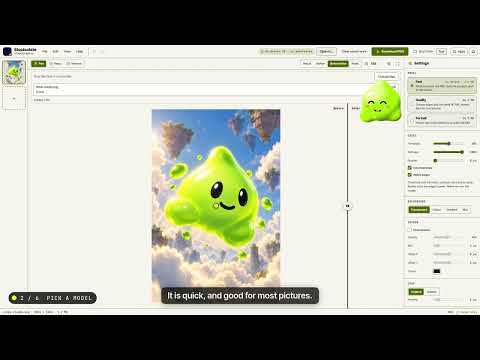
How to do it
- Drop a short video clip (MP4 or WebM) on the page.
- Check the first frame: the subject is cut out and the edges are smoothed over time.
- Run the whole clip. Progress shows frame by frame.
- Save a WebM with a transparent background, or a ZIP of PNG frames where the browser cannot write transparent WebM.
Your files stay on this device: SlopIsolate runs in your browser, with no upload, no account and no watermark.
Questions
How long can the video be?
Short clips work best: every frame is processed on your device, so a few seconds to a minute is practical. The page tells you the limits before it starts.
What format is the result?
A WebM video with an alpha channel. Browsers that cannot write transparent WebM get a ZIP of PNG frames instead.
Is the video uploaded anywhere?
No. Decoding, cutting out and encoding all happen in your browser, and the clip never leaves your device.
More with SlopIsolate
- Bulk background remover: hundreds of images at once
- White background for product photos
- Make a transparent PNG from any picture
Related apps
 PhotoSlop
Live
Photoshop, rebuilt for the browser. SlopVector
Live
Illustrator, rebuilt for the browser. Slop AI Tools
Beta
OCR, speech to text, denoise, auto tags and portrait blur. On your device.