Slop Music · free, in your browser
Play your own music files in your browser
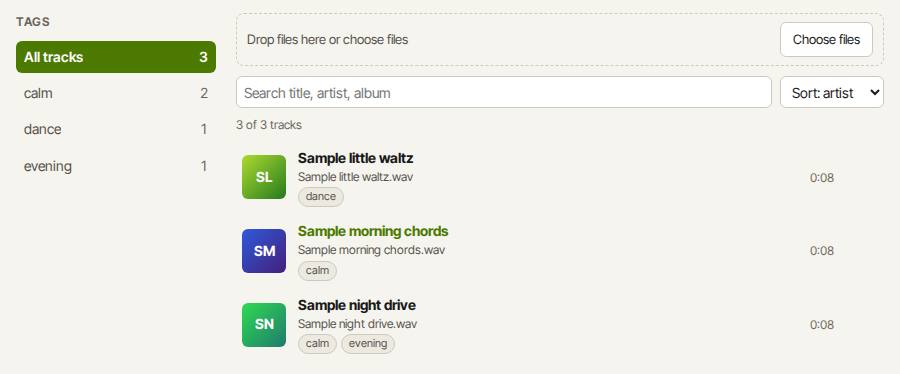
Add the songs you already have and Slop Music builds a library from their tags, with covers, playlists, shuffle and repeat. Nothing streams and nothing is uploaded.
How to do it
- Open Slop Music and press Add files…, or drop audio files on the Library.
- Tracks show their title, artist, album and cover from their ID3 tags. Sort them or search.
- Click a track to play it. Now playing has a waveform you can click to seek, with shuffle, repeat, speed and volume.
- On Playlists, press New playlist, add tracks and drag them into order.
- Use your keyboard's media keys, or the lock screen controls, while it plays.
Your files stay on this device: Slop Music runs in your browser, with no upload, no account and no watermark.
Questions
Which formats play?
MP3, WAV, AAC or M4A and FLAC in the major browsers; Ogg Vorbis and Opus in Chrome, Edge and Firefox. Your browser does the decoding, so a file it cannot play still shows, with a note.
Where are my songs kept?
In Slop Drive, the storage in your browser that every Slopographic app shares. They are copied there when you add them and never uploaded.
Does it have lyrics or an equaliser?
No. Slop Music plays your files: there are no lyrics, no equaliser, and no streaming, radio or podcasts.
Can I try it without my own files?
Yes. With an empty library, press Try it with 3 sample tracks.
More with Slop Music
Related apps
 PhotoSlop
Live
Photoshop, rebuilt for the browser. SlopVector
Live
Illustrator, rebuilt for the browser. SlopIsolate
Beta
Remove backgrounds with AI that runs on your device.